Enhanced Business Services Frequently Asked Questions
- I forgot my password. How can I reset it?
If you forget your password, click the "Forgot Password" link on the login page. Enter your account's email address and submit. You'll receive an email with instructions on how to reset your password.
- How do I complete and submit an Enhanced Business Services draft application?
Under "Login", please enter your email and password. Please use the same email address you used to create your account. After logging in, click your ID number under "My Applications" to complete your certification application.
- What are Enhanced Business Services (EBS)?
Student, Listed, Registered, Globally Registered, and Plus Enhanced Business Services are value-added subscription-based services designed to help entrepreneurs access valuable benefits, discounts, tools, and training. The benefits and discounts provide access to healthcare and financial services, as well as opportunities for additional business support and access to possibilities offered by participating organizations.
Please note that this platform is not a certification service. If you are not a "subscriber," you must go through the application process and be approved to access these enhanced business services.
- How do I sign up?
To sign up, click on the participating organization within your location, click the "Sign Up Now" button, and follow the application instructions. You'll need to provide some basic information and choose your subscription plan.
- What subscription plans are available?
We offer subscription services to all small businesses, entrepreneurs, including college students, 1099 contractors, contingent workers, micro-businesses, and small businesses. Each subscription is available in monthly and annual plans, so you can choose the option that best suits your needs.
- What payment methods are accepted?
Payments are managed with PayPal Subscriptions. Within your PayPal account, you can use any connected account, such as a credit card, debit card, or bank account.
- Is my payment information secure?
Yes, we utilize PayPal's secure application programming interface (API) and adhere to strict industry security standards.
- How do I cancel my subscription?
You can cancel your subscription at any time. Log in to your account, go to the "Subscription" section, and follow the cancellation instructions. You may also cancel your subscription via PayPal. Please note that cancellations are effective at the end of the current billing cycle.
- How do I change my subscription plan?
Yes, you can change your subscription plan at any time from your account settings. The changes will begin at the start of the next billing cycle.
- What happens if my payment cannot be collected?
If your payment fails, you will receive an email notification prompting you to update your payment information. The system will then try to process the payment again. If the payment still fails, your subscription will be canceled. After your account is canceled, you must reapply for a new subscription account. To prevent service interruptions, please keep your payment information up to date.
- Is there a free trial available?
We don't offer a free trial, but you will not be charged for the selected subscription until your application is approved.
- How do I manage my subscription?
You can manage your subscription by logging in to your account and navigating to the "Subscription" section. You can also manage your subscription from your PayPal account. Here, you can update your payment details, change your subscription plan, and view your billing history.
- Who do I contact if I have additional questions?
If you have any questions or need assistance, we are here to help. You can contact (Insert the participating organization's contact information).
- I need help logging in
Please ensure you have entered the correct email address and password, and double-check for typos or capitalization errors. If you've forgotten your password, try using the "Forgot Password" link on the login page to reset it. Be sure you are using the correct credentials for the proper platform. Our benefits come with several sets of credentials, so be sure to keep them organized.
- I'm a Certified MBE. Do I need to create a new login to access these added business services?
Yes, you will need to create a new login. The Enhanced Business Services platform is a subscription-based service offered by participating organizations that gives entrepreneurs exclusive access to benefits, discounts, and resources. This process is not a small-business certification service and should not be mistaken for such services.
- What does a Subscriber receive after being approved for these Enhanced Business Services?
Once a participating organization approves an application, the applicant will receive an email confirming their approval and outlining the subscription terms. The following business day, PayPal will process the subscription payment.
Due to the time required to set up access to the enhanced business services, new subscribers will receive their login credentials and MetLife Insurance details in less than a week. New subscribers are submitted to our EBS partners on Wednesday. New subscribers will be able to access the EBS platform once their application is approved.
- Do I have to use PayPal for this service?
Currently, we use PayPal as a secure, reliable merchant service to handle payment information and subscription details. We are discussing other options internally, but for now, this will remain the only option for subscribers.
About Paypal
PayPal Payment Gateway
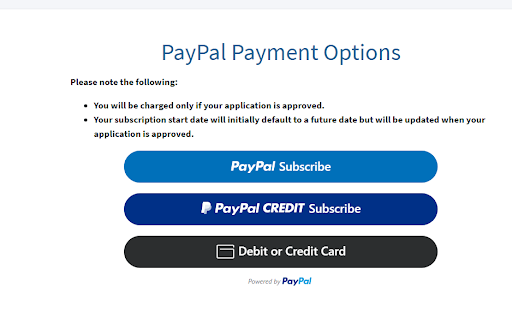
Enhanced Business Services subscriptions are managed through the PayPal payment gateway. You'll need to create a PayPal account if you don't already have one. This account allows you to manage your subscription and receive notifications. Additionally, PayPal enables you to dispute any charges through your credit or debit card company if you encounter any issues. To create and manage your PayPal subscriptions, please log in to your PayPal account and follow the necessary steps.
PayPal Subscribe

PayPal Subscribe is a payment gateway that facilitates automatic recurring payments, including subscriptions and billing agreements. This service allows merchants to charge you without requiring you to sign in to your PayPal account. You can use debit, credit cards, and other payment sources through PayPal Subscribe.
PayPal Credit Subscribe

PayPal Credit is a line of credit offered through PayPal by Comenity Capital Bank, allowing you to pay for your purchases now or over time. It's easy to apply for and use.
Payment Sources: Credit cards, debit cards, bank accounts, etc.

This option allows you to set up your preferred payment method for automating and processing the Enhanced Business Services subscription.